
As organizations grow and processes change, many companies using Sage BusinessVision seek ERP systems that offer easier integration, simpler scalability, and enhanced user experience. This guide explores leading ERP replacements available in Canada, highlighting their main differences from Sage BusinessVision, their strengths, and practical migration considerations. You’ll also find notes on industry-focused options and why consulting support can facilitate a smoother transition. Use this to compare choices and plan a migration aligned with your operational goals.
Key Differences Between Sage BusinessVision and Its Alternatives
Sage BusinessVision is a traditional, on-premises ERP solution primarily focused on financial management and basic business processes. While it serves small to mid-sized businesses well, it has limitations in cloud capabilities, scalability, and modern integrations. The alternatives listed below offer varying degrees of cloud-native architecture, broader functionality, and enhanced customization options.
| ERP Solution | Main Differences from Sage BusinessVision | Key Features | Benefits |
|---|---|---|---|
| Sage Intacct | Cloud-native with advanced real-time financial reporting and multi-entity management, unlike BusinessVision’s primarily on-premises setup. | Cloud-native architecture, real-time financial reporting | Scales easily and adapts as finance teams grow |
| Sage 300 | Supports multi-currency and multi-entity operations with a more comprehensive financial suite, offering greater complexity handling than BusinessVision. | Comprehensive financial suite, multi-currency & multi-entity support | Well-suited for companies with complex accounting needs |
| Sage 50 | Designed for small businesses with simpler accounting needs, Sage 50 offers a more modern interface and cloud-connected features compared to BusinessVision’s legacy system. | Accounting-focused, cloud-connected options, inventory management | Affordable and user-friendly for small businesses |
| NetSuite | Fully cloud-based, integrated business management platform with CRM and e-commerce capabilities, providing a broader scope than BusinessVision. | Scalable business management platform with integrated CRM | An all-in-one solution that supports growing operations |
| Acumatica | Flexible cloud ERP with customizable dashboards and workflows, offering more adaptability than BusinessVision’s fixed processes. | Flexible ERP with customizable dashboards and workflows | Can be tailored to match specific business processes |
| Microsoft Dynamics 365 Business Central | Cloud-based with native integration to Microsoft 365 and Power Platform, enhancing productivity beyond BusinessVision’s capabilities. | Native integration with Microsoft 365 and Power Platform | Boosts productivity with familiar interfaces and tools |
Each alternative extends core ERP capabilities beyond what Sage BusinessVision offers, especially in cloud readiness, scalability, and integration. Your choice should depend on how well the system aligns with your business processes, integration needs, and growth plans.
Industry-Specific ERP Solutions
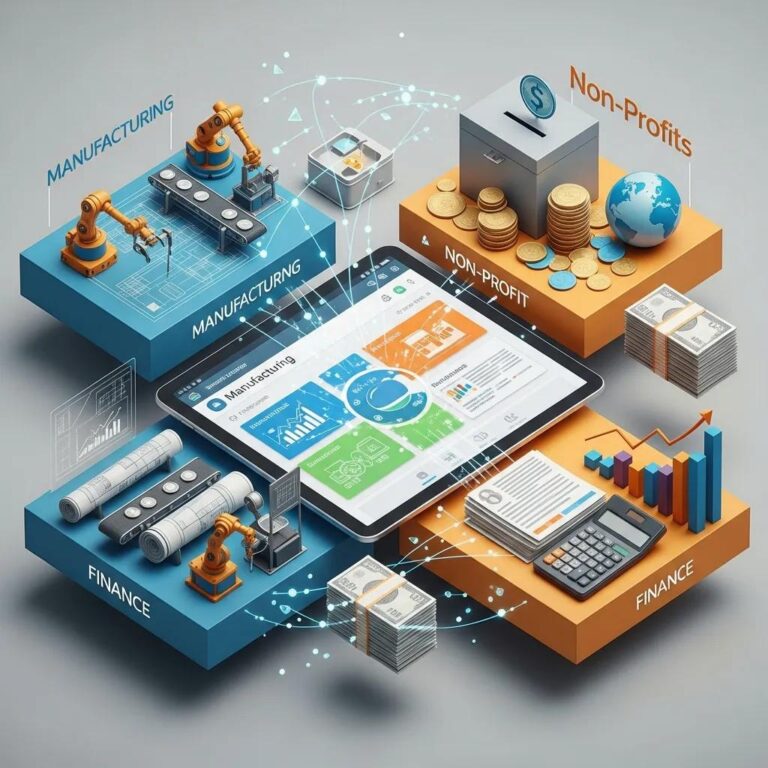
Industry-specific ERP systems address operational needs unique to different sectors. Choosing a solution built for your industry reduces customization, speeds implementation, and improves long-term support. Common examples include:
- Manufacturing ERP Solutions: Modules for inventory, production planning, and quality control help manufacturers optimize throughput and lower waste.
- Non-Profit ERP Solutions: Tools for donor management, grants tracking, and program reporting make it easier to measure impact and remain transparent to stakeholders.
- Financial Services ERP Solutions: Features for compliance, risk management, and detailed financial reporting help institutions meet regulatory requirements.
Selecting an ERP that aligns with your industry reduces the need for heavy customization and improves the fit between software and business processes.
Careful attention to industry requirements and proven implementation practices greatly improves the odds of a successful deployment.
Industry-Specific ERP Implementation & Best Practices
Adopting industry best practices during ERP implementation helps organizations modernize inefficient processes. When specialized needs require customizations, those changes should be made judiciously—because heavy customization can complicate future upgrades and increase maintenance costs. For companies in niche sectors, it’s especially important to balance custom solutions with standard software capabilities so the core ERP remains maintainable and upgradeable over time.
Implementation Challenges of Industry-Specific ERP System Solutions by Utilizing Best Practices, T Orosz, 2023
Sage BusinessVision: Migration Strategies and Challenges

Moving off Sage BusinessVision requires deliberate planning. A successful migration combines a clear needs assessment, a robust data strategy, and thorough training. Below are pragmatic steps to reduce risk and keep your project on schedule.
- Needs Assessment: Map current processes, identify gaps, and define the outcomes you expect from the new ERP to ensure a strong functional fit.
- Data Migration Strategies: Prepare a plan for data cleansing, mapping, and validation. Decide whether a phased, parallel, or direct conversion approach best fits your data complexity and downtime tolerance.
- Training and Support: Deliver role-based training and post-go-live support so teams adopt the new system quickly and confidently.
Addressing these areas up front helps prevent common pitfalls and keeps the migration focused on business value.
Research consistently highlights the importance of structured data conversion plans and using automation where appropriate to reduce disruption.
ERP Data Migration Strategies & Best Practices
Data conversion is a critical component of any ERP rollout. Common approaches include direct, phased, and parallel conversions, plus the use of automated migration tools. Each approach has trade-offs in terms of risk, time, and resource needs. Studies generally recommend a phased approach combined with automation to minimize disruption, ensure data quality, and allow teams to validate results incrementally.
Data conversion strategies for ERP implementation projects, 2023
Consulting Services and Support
Bringing in experienced consultants often speeds decision-making and cuts implementation risk. IWI Consulting Group provides ERP consulting to help companies choose the right system and get it up and running. Typical services include:
- Needs Analysis: A detailed assessment to match business requirements with the right ERP fit.
- Implementation Support: Configuration, testing, and go-live assistance to ensure the system meets operational needs.
- Training Programs: Role-based training and documentation to drive user adoption and reduce downtime.
Working with consultants reduces surprises during migration and helps teams focus on using the new ERP to improve operations.
How to Schedule a Demo or Business Review
Scheduling a demo or business review is a practical next step in shortlisting ERP vendors. Follow these steps to get the most from vendor meetings:
- Identify Your Needs: List priority features, integrations, and reporting requirements before you contact providers.
- Contact Providers: Reach out to selected vendors, explain your goals, and request a tailored demo.
- Share Relevant Details: Provide sample data, key workflows, and user roles so the vendor can demonstrate how the system fits your business.
These steps help vendors deliver focused demos that show how the ERP will perform in your environment.
Conclusion
Transitioning from Sage BusinessVision to a more modern ERP solution can significantly enhance your organization’s efficiency, scalability, and integration capabilities. By exploring tailored alternatives, you can find a system that aligns with your specific operational needs and industry requirements. Engaging with experienced consultants can further streamline your migration process, ensuring a successful implementation. Take the next step in optimizing your business processes by scheduling a demo with a leading ERP provider today.
Frequently Asked Questions
What factors should I consider when choosing an ERP replacement for Sage BusinessVision?
Look at scalability, ease of integration, user experience, and industry-specific functionality. Also consider vendor support, total cost of ownership (implementation, licenses, and maintenance), and how well the ERP maps to your current processes. A thorough needs assessment will highlight must-haves versus nice-to-haves.
How can I ensure a smooth data migration to a new ERP system?
Start with a data audit to identify what to migrate. Build a migration plan that includes cleansing, mapping, and validation. Use automated tools where possible, run test migrations, and involve stakeholders so data quality is verified before go-live.
What are the common challenges faced during ERP implementation?
Typical issues include resistance to change, insufficient training, and data-related problems. Misalignment between the ERP and existing processes can also slow projects. Mitigate these risks by engaging stakeholders early, providing role-based training, and appointing a dedicated project manager.
How important is ongoing support after ERP implementation?
Ongoing support is essential. It helps resolve post-go-live issues, applies updates, and supports new users or processes. A strong vendor or consulting partner relationship ensures the ERP continues to deliver value as your business evolves.
What role do consulting services play in ERP migration?
Consultants bring experience in vendor selection, project planning, and implementation. They can tailor configurations, manage complex integrations, and train teams—reducing risk and accelerating time to value.
Are there specific ERP solutions tailored for small businesses?
Yes. Many ERP vendors offer scaled packages for small businesses that prioritize affordability and ease of use. Solutions like Sage Intacct, Sage 300, and Acumatica are often a good fit because they scale as the business grows.
How can I evaluate the effectiveness of an ERP solution post-implementation?
Set clear KPIs tied to your goals—operational efficiency, user adoption, cycle times, and financial performance. Monitor these metrics, gather user feedback, and schedule regular reviews to identify improvements and ensure the system continues to meet business needs.
How IWI Consulting Group Can Help Sage BusinessVision Customers
IWI Consulting Group specializes in assisting Sage BusinessVision customers through every stage of their ERP transition. With deep expertise in both Sage products and alternative ERP solutions, IWI offers personalized guidance to identify the best fit for your business needs. Their services include comprehensive needs assessments, tailored migration planning, and hands-on implementation support to minimize disruption and maximize ROI.
Beyond technical deployment, IWI provides role-based training and ongoing support to ensure your team quickly adapts to the new system and leverages its full capabilities. Their proven methodologies help mitigate common migration risks and streamline change management, making the transition smoother and more predictable.
Partnering with IWI Consulting Group empowers your organization to confidently move beyond Sage BusinessVision, unlocking enhanced scalability, integration, and operational efficiency with a modern ERP solution.