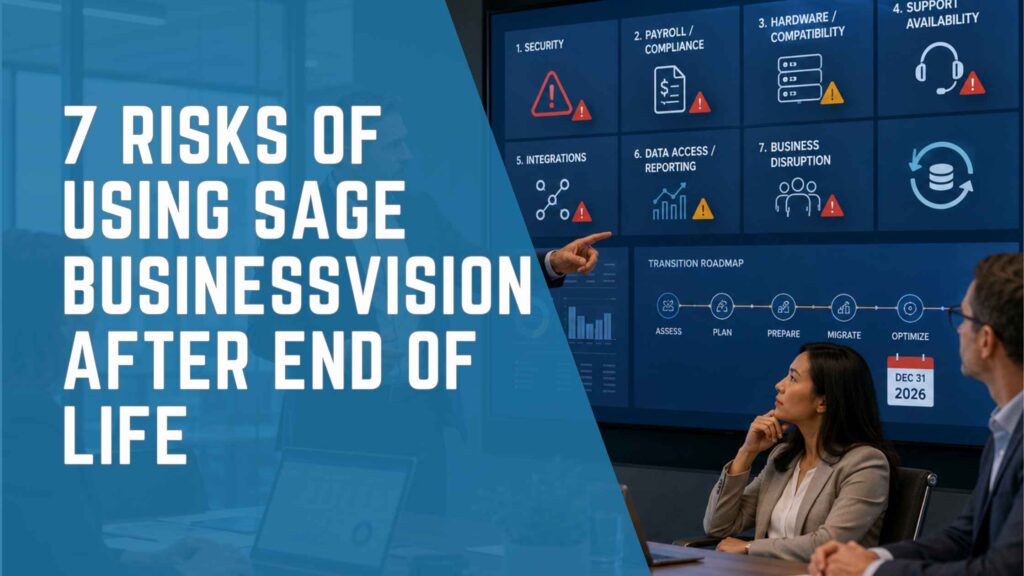
Sage BusinessVision will reach End of Life on December 31, 2026. After that date, Sage will no longer provide software updates, fixes, security patches, payroll updates, compliance updates, technical support, or payroll calculations for any BusinessVision edition.
The software may continue to operate, but continued operation is not the same as continued security, compatibility, compliance, or support. Canadian companies that remain on BusinessVision should understand the risks, document an interim continuity plan, and begin evaluating a replacement before an urgent failure limits their options.
For the official timeline, product overview, and comparison of Sage 50, Sage 300, and Sage Intacct, read our complete Sage BusinessVision End of Life and ERP alternatives guide.
(Official source: Sage BusinessVision End of Life – Customer FAQ)
What Changes After December 31, 2026?
| Area | After Sage BusinessVision End of Life |
|---|---|
| Software Maintenance | No Sage software updates or fixes |
| Security | No Sage security patches |
| Payroll and Compliance | No Sage payroll calculations, payroll updates, or compliance updates |
| Technical Support | No Sage technical support |
| Compatibility | Future operating-system, hardware, and integration compatibility is not maintained by Sage |
| Business Responsibility | The organization assumes responsibility for continued operation, support, recovery, and risk management |
Risk 1: No Security Patches or Vendor Fixes
After End of Life, Sage will no longer issue BusinessVision security patches or software fixes. If a vulnerability, defect, or compatibility issue is discovered, the organization should not assume that a vendor update will be available.
The risk is not limited to the BusinessVision application. The complete environment may include the database, server, workstations, remote-access tools, network, printers, integrations, backups, and user accounts. A weakness in any component can affect access to financial, payroll, customer, vendor, inventory, or employee information.
Actions to take now:
- Review users, administrator privileges, passwords, remote access, and inactive accounts.
- Confirm that backups are protected, complete, and regularly tested for recovery.
- Document server, database, workstation, endpoint, network, and integration dependencies.
- Review cyber-insurance and internal security requirements for unsupported software.
- Create a migration and incident-response plan before a security event occurs.
Risk 2: Payroll and Compliance Exposure
Sage states that BusinessVision payroll calculations, payroll updates, and compliance updates will no longer be provided after December 31, 2026. Canadian organizations that use BusinessVision for payroll-related processes should determine how future calculations, tax tables, forms, remittances, records, and reporting will be maintained.
An unsupported calculation or form may create operational work, employee-impact risk, correction costs, or reporting problems. The organization should involve the appropriate payroll, HR, accounting, tax, legal, and external advisory resources when defining the interim and future process.
Actions to take now:
- Document every payroll and compliance process that depends on BusinessVision.
- Confirm who owns updates, validation, approvals, remittances, and record retention.
- Evaluate whether payroll should move with the ERP or to a dedicated connected solution.
- Test calculations, reports, exports, and integrations before changing systems.
Risk 3: Operating-System and Hardware Incompatibility
BusinessVision may continue operating in its current environment, but servers, workstations, operating systems, databases, printers, and security tools will continue changing. A future Windows update, server replacement, workstation refresh, database change, or infrastructure failure may affect an application that is no longer maintained by Sage.
The organization may become dependent on aging hardware or a specific technical configuration that is difficult to reproduce. If that environment fails, restoring the application can take longer and may require expertise that is not immediately available.
Actions to take now:
- Inventory all hardware, software, database, network, printer, and remote-access dependencies.
- Confirm recovery procedures for both data and the complete application environment.
- Avoid untested infrastructure changes without rollback and recovery plans.
- Include infrastructure replacement and compatibility in the migration timeline.
Risk 4: Declining Availability of Specialized Support
After vendor support ends, companies may rely more heavily on internal employees or third parties who understand BusinessVision, its database, reports, customizations, and integrations. Over time, those resources can become more difficult to find, schedule, or replace.
Knowledge concentration creates additional risk. If one employee or consultant is the only person who understands a critical report, integration, export, or recovery process, the organization may face delays when that person is unavailable.
Actions to take now:
- Identify the people who understand the application, database, reports, integrations, and infrastructure.
- Document recurring procedures, troubleshooting steps, custom reports, and data flows.
- Confirm the scope and availability of any third-party support after End of Life.
- Use the migration project to transfer knowledge and reduce dependence on individuals.
Risk 5: Integration and Workflow Failures
BusinessVision may exchange information with ecommerce, CRM, banking, payment, payroll, tax, warehouse, reporting, shipping, or other applications. Connected systems may change their APIs, security requirements, file formats, authentication methods, or supported versions after BusinessVision reaches End of Life.
When an integration fails, teams may resort to manual entry, spreadsheets, duplicate processing, or delayed updates. This can increase errors and reduce visibility across finance and operations.
Actions to take now:
- Create a complete list of integrations, imports, exports, scheduled jobs, and manual handoffs.
- Document data owners, frequency, formats, authentication, error handling, and dependencies.
- Identify integrations that are business-critical or difficult to replace.
- Include integration design, testing, monitoring, and ownership in the replacement scope.
Risk 6: Data Access, Reporting, and Audit Challenges
Years of customer, vendor, inventory, payroll, transaction, and financial history may remain in BusinessVision. If the application or infrastructure becomes unavailable, the company may have difficulty retrieving information needed for operations, reporting, audit, tax, customer service, or regulatory obligations.
A rushed migration can create a different problem: moving data without a clear retention and validation plan. Not every record must necessarily be loaded into the new ERP, but required information must remain accurate, secure, searchable, and available to authorized users.
Actions to take now:
- Define which master records, balances, open transactions, history, attachments, and reports must be preserved.
- Confirm retention and access requirements with accounting, tax, payroll, legal, and compliance advisors.
- Assign responsibility for data cleansing, mapping, reconciliation, validation, and approval.
- Plan for converted history, reports, exports, a read-only archive, or a secured legacy environment.
- Test that authorized users can retrieve required historical information after migration.
Risk 7: Business Disruption from an Emergency Migration
The greatest risk may be waiting until a security event, hardware failure, incompatibility, payroll issue, or support problem forces an emergency decision. A compressed project leaves less time to document requirements, compare solutions, clean data, redesign processes, test integrations, train users, reconcile results, and prepare cutover.
An emergency migration can also shift the buying decision from “Which solution best supports our business?” to “Which solution can we deploy fastest?” That may increase implementation risk and create another system that does not fit long-term requirements.
Actions to take now:
- Begin requirements discovery before selecting or demonstrating products.
- Approve a project owner, decision process, resources, and executive sponsor.
- Define the replacement path, data scope, integrations, reporting, testing, and training plan.
- Create a realistic timeline based on scope and resource availability.
- Maintain a documented interim continuity plan until the new system is stable.
How to Reduce the Risks Before Support Ends
| Priority | Recommended Action |
|---|---|
| Immediate | Confirm the December 31, 2026 deadline; assign ownership; inventory the current environment; verify backups and recovery. |
| Assessment | Document financial, inventory, payroll, reporting, integration, security, user, data, and growth requirements. |
| Selection | Compare Sage 50, Sage 300, Sage Intacct, and other appropriate options against documented requirements. |
| Planning | Define implementation scope, responsibilities, data migration, integrations, reports, testing, training, cutover, and support. |
| Execution | Configure, migrate, reconcile, test realistic scenarios, train users, and obtain go-live approval. |
| Stabilization | Monitor transactions, reports, integrations, reconciliations, adoption, and open issues after go-live. |
Frequently Asked Questions
When does Sage BusinessVision support end?
All Sage BusinessVision editions reach End of Life on December 31, 2026.
Will BusinessVision stop working after End of Life?
Not necessarily. It may continue operating on compatible systems, but Sage will no longer provide maintenance, fixes, security patches, payroll and compliance updates, or technical support.
What is the biggest risk of continuing to use BusinessVision?
The risk depends on the organization, but an emergency caused by security, hardware, compatibility, payroll, data, integration, or support failure can force a rushed migration with limited time for assessment and testing.
Can the risks be eliminated without replacing BusinessVision?
Controls such as backups, security reviews, documentation, support planning, and continuity procedures can reduce some risks, but they do not restore Sage maintenance, security patches, payroll updates, compliance updates, or technical support.
What are the main replacement options?
Potential paths include Sage 50, Sage 300, Sage Intacct, or another ERP. The correct choice depends on accounting, inventory, companies, reporting, automation, integrations, cloud, security, and growth requirements.
How should a company start planning?
Start with a current-system assessment and requirements discovery. Document the environment, processes, data, reports, integrations, risks, users, and future goals before selecting a replacement.
Plan Before an Emergency Limits Your Options
IWI Consulting Group can assess your current BusinessVision environment, document financial and operational requirements, compare replacement paths, define migration scope, prepare data, implement the selected solution, train users, and support the system after go-live.
Start planning before December 31, 2026 so your organization can make a requirements-based decision and complete a controlled transition instead of reacting to an urgent failure.