IWI Consulting Group - authorized Sage partner Ontario, Canada

Category: Uncategorized

Reduce Inventory Management Mistakes with These Four Tips

inventory managementMistakes happen to everyone, but there are some business areas where mistakes can be costly. One of those areas is the warehouse. A single mistake can pile up and create more issues down the line giving your customers a poor impression of your business. Unhappy customers may take their business to a competitor. In fact, inventory management mistakes can cost your business thousands of dollars a year.

If you want to improve profitability by reducing inventory management mistakes, try these four tips.

Tip #1: Automate your warehouse.

Automated warehouses use barcode scanners, inventory management systems, and other tools to log goods into the warehouse and log them out again during fulfillment. Such systems reduce the amount of manual errors made by failing to count items, mistaken counts, and mistakes during data entry.

Tip #2: Add structure to the inventory fulfillment process.

If your warehouse doesn’t have a structured process for receiving orders, picking, packing and shipping, you are leaving the success rate on your order fulfillment to chance. You can reduce mistakes and close gaps in the system by creating a structure and process that details each step for your employees. Make sure that the process is in writing, and train your employees on each step in the process. Don’t leave it to your employees to create the steps in the process or you will end up with many, perhaps competing, processes in place.

Tip #3: Reduce the number of steps in order fulfillment.

Another area that can be problematic for many companies is that the number of steps it takes to fulfill orders is so lengthy and complicated that employees can’t remember them easily. Any process with more than a handful of steps is open to mistakes. Spend some time in the warehouse working alongside your team to actually see what’s working and what doesn’t. Then update the process, reducing redundant steps and making it simple and effective.

Tip #4: Set a baseline to measure improvement.

You may have heard from employees that there are “many” mistakes being made in the shipping process. Just how many mistakes qualify as “many?” Whenever you can, quantify the situation and set a baseline so that you will know for certain whether improvements you make are having the desired effect.

Let’s assume that you know that as of today, 5% of orders have a mistake in them. When you examine this data, you see that employees are mixing up packages, placing the wrong packages in the wrong shipper’s bins. This delays orders because the packages are returned from the incorrect shipper.

Given that 5% figure and an understanding of the nature of the problem, you can now take action steps to rectify it. You can reward employees for reducing the error rate. There are many things you can do to reinforce the positive nature of your improvements. Without the baseline, however, there’s no way to know whether changes made any impact at all.

IWI Consulting

IWI Consulting Group helps businesses gain insights into their operations, inventory, and profitability. Learn more about our software systems for distribution and inventory management. We provide software and support for a wide range of industries throughout the Toronto area. For more information, please visit IWI Consulting Group or contact us today.

Read More

Enterprise Software for Better Value, Productivity, and Profitability

Sage X3Yes, Please! With Sage EM (formerly known as Sage X3), It’s Possible
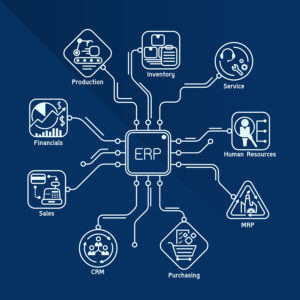
What if we told you that investing in new enterprise software would add value to your company? Boost productivity – and profitability? You’re probably wondering, “Where can I sign up for that?”

It’s as simple as a new ERP system. Sage EM (formerly known as Sage X3) is built for small to medium-sized manufacturing firms. Sage understands the challenges faced by small and growing businesses and has created a robust information system that addresses finance, supply chain, and production needs.

Here’s how Sage EM (formerly known as Sage X3) helps build value, productivity, and profitability in your manufacturing business.

New Enterprise Software Offer Better Value

Older business systems often piece together disparate software packages like a patchwork quilt, stitching them together with custom programming that works – most of the time.

Newer enterprise software such as Sage EM (formerly known as Sage X3) offer comprehensive functions built into the package so that you do not have to fuss with integrations. Not only is finance, supply chain management, and production offered in one software package, but many other needs of a growing manufacturing or distribution business are addressed, too. Human resources, sales, and marketing components may be added to build out your system so that you don’t need custom programming or cumbersome resources to make them all work together.

Newer systems are also designed with the flexibility that manufacturers need. Such systems are cloud-based, delivered over the internet, with data stored and secured on off-premises servers. This negates the need for expensive hardware upgrades and the staff to run and maintain them.

To sum up, the many ways in which newer enterprise software systems offer better value includes:

  • More software capabilities in a single package than previously offered;
  • Flexible internet-based software that runs on almost any connected device;
  • Easier integration with other software for business management needs;
  • Reduced investment in hardware;
  • Lower staffing costs.

These benefits really add up when considering the cost of maintaining the status quo. New systems may lead to better growth and profitability.

The Benefits of an End-to-End ERP Solution

Comprehensive enterprise software solutions such as Sage X3 offer many benefits in addition to the ones listed above. In addition to lowered costs and better capabilities, manufacturers may also benefit by:

  1. Reduced ramp up time and faster time to market.
  2. Increased production at lower costs.
  3. Improved quality control, product traceability, and other QC methods.
  4. Better compliance with inventory management rules.
  5. Improved ability to comply with safety regulations.
  6. Enhanced supply chain management abilities.
  7. Higher customer satisfaction levels.

With such a long list of benefits, it’s time to upgrade to Sage EM (formerly known as Sage X3). Sage understands the needs of manufacturers and has even built special modules for manufacturing niches such as food and drink, pharmaceuticals and cosmetics, and many other areas.

About Sage EM (formerly known as Sage X3)

Sage EM (formerly known as Sage X3) offers a better way to manage your entire business. From financials through the supply chain and production centers, Sage EM (formerly known as Sage X3) offers a rich, integrated functionality that’s tailored to manufacturing.

Sage EM (formerly known as Sage X3) can help you with:

  • Finance: Budgeting, forecasting, fixed asset management and financial reporting are just some of the many areas that Sage EM (formerly known as Sage X3) makes easier and faster.
  • Supply chain management: Keep up with demand and ensure efficiencies through real-time monitoring of purchasing, inventory management, customer services and sales.
  • Production: Shop floor control, BOM planning, quality control and project management are all included in Sage EM (formerly known as Sage X3). No need to purchase separate modules with a comprehensive, end to end ERP solution.

Versatile cloud deployment means that there is no special hardware to purchase. Sage EM (formerly known as Sage X3) runs on any internet connected device including desktop computers, laptops, tablets and more. Real-time data synchronization also means that whether you’re working in Tokyo or Toronto, you’re seeing the same information in the system as your coworkers.

To learn more contact IWI Consulting Group today. We’d be glad to help you with your Sage EM (formerly known as Sage X3) implementation.

IWI Consulting

IWI Consulting Group helps businesses gain insights into their operations, inventory, and profitability. We provide software and support for a wide range of industries throughout the Toronto area. For more information, please visit IWI Consulting Group or contact us today.

Read More

Is It Time to Upgrade Your ERP System?

3D illustration of ERP satisfaction feedback system with needle pointing the lower position. When the Time Is Right for Sage EM (formerly known as Sage X3)

You know that your company needs a new ERP system. The existing software is slow, requiring nightly manual batch updates that bog down the entire network. Production is upset that they can’t get real-time figures. Your supply chain manager wants to know why she can’t get accurate information on where shipments are when customers are waiting for orders. It’s a headache that many manufacturers face.

There are certain signs that your current ERP system no longer meets your company’s needs. Do you know what to look for to determine when the time is right to upgrade your ERP system?

Some hints that it’s time to upgrade your ERP system include:

  1. Slow decision-making: Although some people may just prefer more time to consider all of their options, slow decision-making may also be a sign of an aging ERP system. If you are waiting to collect data from your system, or you need someone staff to verify the accuracy of the data that you are pulling from your system, it’s a sign that your system is outdated. Systems such as Sage EM (formerly known as Sage X3) provide real-time data so that you never have to worry about whether the data has been refreshed or not; it’s always displaying real-time information. Accuracy is also greatly improved. You are no longer pulling data from the system, entering it into spreadsheets, and double checking your work to detect data entry errors. Clean, real-time data, fed into easy-to-read reports is one of the benefits of a newer ERP system such as Sage EM (formerly known as Sage X3).
  2. Constantly tweaking the system with custom programming: Another sign of an aging system is what’s been dubbed the ‘band aid’ effect. Every time you need the system to integrate with a newer piece of software, it requires custom programming. Patches, special programs to synchronize data and systems, and other tweaks to get your current system to play nice with others are another sign that it’s time to upgrade. New ERP systems such as Sage EM (formerly known as Sage X3) integrates well with other systems, requiring little to no custom programming. Sage creates modules for common manufacturing and business needs such as HRIS, CRM, finance, production, and supply chain management. These modules integrate well when used together and can provide a comprehensive suite of software for all of your business needs. If you are constantly tweaking your system so that it doesn’t crash or paying extra to ensure it works with newer software, consider upgrading the entire system to Sage EM (formerly known as Sage X3) and the Sage family of products. Then you will be sure of having a system that easily integrates with other business systems.
  3. You’re having trouble finding someone to fix it: Another sign of an aging ERP system is that it gets harder and harder to find someone to fix or update it. Upgrades may no longer be available. The special programming skills require to fix the system or build special modules may no longer be readily available, or you may have to pay more for them. Sage EM (formerly known as Sage X3) is updated regularly, and excellent support is available for your Sage EM (formerly known as Sage X3) needs through IWI Consulting Group.

Curious to learn more about Sage EM (formerly known as Sage X3)? IWI Consulting Group offers a free virtual tour of Sage EM (formerly known as Sage X3). Find out more on our site.

Keeping older systems running may, in the long run, be more costly than investing in a new ERP system. Cloud-based systems do not require expensive investments in specialized hardware or IT staff to run them. The training time is minimal, and maintenance and security are taken care of by the cloud host. Software such as Sage X3 can end up making your business more efficient and profitable. It pays to invest in a new ERP system!

IWI Consulting

IWI Consulting Group helps businesses gain insights into their operations, inventory, and profitability. We provide software and support for a wide range of industries throughout the Toronto area. For more information, please visit IWI Consulting Group or contact us today.

Read More

Best Practices for Data Management: Using Sage X3 Efficiently

Double exposure of business woman does data management.Manufacturing is all about efficiencies. The more efficient your operation, the more profitable it can be. To improve efficiencies throughout your company, using a manufacturing ERP software package such as Sage X3 can enhance efficiencies throughout the supply chain, production, finance and more. One way in which you can improve efficiency is by better data management.

There’s an old saying in computers, “Garbage in – garbage out.” It means that the quality of the outputs is only as good as the quality of the inputs into the computer system.

You’ve seen this yourself in the manufacturing process. High-grade raw materials entered into the start of the manufacturing process results in a better product. Better products result in higher customer satisfaction and eventually, high demand as word spreads that your company produces the best quality products in the industry.

Well, the same may be said for data. Your Sage X3 system can yield accurate, insightful reports – or it may yield incorrect data, depending on the inputs.

To ensure you get the most from your manufacturing ERP software, put into place the following best practices for data management. Quality in – quality out in all things, including Sage X3.

Data Management Best Practices

Thanks to the Internet of Things (IoT), many aspects of your manufacturing center now collect data. Workspaces, equipment, even raw materials may be tagged with electronic devices that supply your company with data. This data must be managed correctly in order to produce accurate reports that yield better business insights.
Some data management best practices to put in place include:

  1. Collect only what you use: Just because you can collect large amounts of data doesn’t mean that you should. What will you use? What do you need? These are the questions that should drive the process of choosing data elements to collect. When you determine what information is most helpful to improve business processes, you can review the data elements that are necessary to collect such information. Reports from Sage X3 draw from numerous sources of data, but not every source of data is equally important. To avoid feeling overwhelmed by your data, be selective in what you collect, monitor, and use. More isn’t necessarily better.
  2. Demand real-time data: Sage X3 provides real-time data to help you with business decisions. Other systems may rely on batch uploads, nightly reconciliations, or other methods of managing data that cause delays between what’s occurring and what is reported in the system. Delays can be costly. When real-time data is easily obtained, switching to Sage X3 if you use another system just makes sense.
  3. Use reports to analyze data: It’s tempting to peek at raw data to see general trends, but the robust reporting features of Sage X3 make it a far better tool to understand what’s happening in your business. By using the reports from your system, you’ll be able to see more than macro trends. You’ll be able to drill down into the data to get a better picture of your business and make sound plans for its future.
  4. Build a data dictionary: For information that must be manually entered into the system, it’s important to create a data dictionary. Data dictionaries define the fields in your system so that everyone using the system will use it consistently.
  5. Create data rules: Data rules are also an important best practice when managing data. Data rules define what’s important enough to be entered into the system, as well as how to enter it. Data rules may also spell out who can override data or correct mistakes in the system. By limiting this access to a small group of people, you limit the number of mistakes that can creep into the data.

The world of manufacturing data has come a long way from spreadsheets, tick counts on clipboards, and guesswork. If you’re still on the fence about switching to manufacturing ERP software, we’d like to invite you to explore Sage EM (formerly known as Sage X3).

Finance, supply chain management, and production can all be managed through a single dashboard and real-time data that enhances your understanding of what’s happening in your business and helps you improve decision making.

IWI Consulting Helps Business Be More Efficient

IWI Consulting Group helps businesses gain insights into their operations, inventory, and profitability. We provide software and support for a wide range of industries throughout the Toronto area. For more information, please contact us today.

Read More

Sage X3: Growing Faster without Adding Overhead

Sage X3Strong growth is how companies survive—and thrive. The absence of growth is stagnation. Yet to grow, companies automatically assume that they must add overhead. Salaries, benefits, office space all add up. Sometimes it seems as if rapid business growth eats up all of the potential profits. Planning for growth can be difficult.

Managing your overhead, personnel costs, supply chain inputs, warehouse space, shipping, receiving, and operational tasks all change with growth. Staying flexible, nimble and responsive helps you meet higher demand without stumbling.

Another way to support increased demand is by using cloud-based ERP tools. Sage X3 is a cloud-based enterprise resource planning tool that supports rapid growth without high-cost increases. You can do more with greater efficiency using Sage X3.

Sage X3 is a cloud-based software package that provides support for all areas of your organization without a significant investment in hardware, software, and infrastructure to support it. As a cloud-based system, it runs through an internet connection. Any device that can access the internet can be used to run Sage X3.

New hires may not necessarily need to work on site. You can add a virtual workforce, asking people to use their own computer equipment to log into Sage X3 to do their work. It’s simple and efficient.

We’d like to invite you to take a personal, virtual tour of Sage X3. IWI Consulting Group presents a comprehensive system-wide tour that will help you understand the many features and benefits of Sage X3. Visit us and take the tour.

Reasons for Sage X3 Adoption: Cloud Increases Productivity with Minimal Costs

Here are some statistics that may help you understand how cloud-based ERP such as Sage X3 lowers costs while support profitable business growth.

For example:

  • 85% of business experts believed that cloud technology can help them grow faster.
  • 94% of IT departments expect they will increase and expand the use of cloud technology in the next 12 months.
  • Global adoption of cloud-based ERP is soaring, from just around 9% in 2014 to a projected adoption rate of 32% by 2018.

There are many reasons why companies choose cloud ERP. Among the top reasons:

  • 84% desire to drive business growth.
  • 74% strive for a more agile workplace.
  • 64% hope to save time on routine business tasks so they can focus on other tasks.
  • 52% look to simplify software management.
  • 44% seek to reduce operation costs.

Once companies do implement cloud-based solutions, what happens? Many realize their goals of strong growth without burdensome costs. Those among the surveyed group who did implement cloud solutions found that their companies grew 21% more profitable than comparable companies who did not use a cloud solution. They also grew at a rate of 26% faster.

Organizing for Growth

Embracing cloud technology is just one step to support your company’s fast growth. Organizing your workforce around growth-focused initiatives is another. Delegating and sharing tasks, cross-training, and other methods of spreading the work out among different groups can also help keep your company humming as it tackles new clients, new orders, and keeping up with faster growth.

Make It Rain with the Cloud

Get your buckets out to catch the “rain” generated by the cloud. In sales, “rainmakers” are those who bring in the customers and the sales. While implementing a cloud-based ERP system alone won’t generate new sales or repeat sales, it will support improved productivity, enhanced communication, and rapid business growth, all without the added costs of hardware and the people to support it.

IWI Consulting

IWI Consulting Group helps businesses gain insights into their operations, inventory, and profitability. We provide software and support for a wide range of industries throughout Canada. For more information, please visit IWI Consulting Group or contact us today.

Read More

Use an ROI Analysis to Make the Case for Sage X3

Sage X3If you need to build a business case to boost support for Sage X3, one great way to support your request is through an ROI analysis. ROI stands for “return on investment.” Management likes to see figures that support new technology initiatives. An ROI analysis can help you build the case to purchase and use Sage X3.

A Forrester poll of IT decision makers shows that 93 percent agree that providing a written business case to justify new work or software requests is very important. In a manufacturing environment, where every penny counts, completing an ROI report may make the approval and adoption of Sage X3 easier.

What Is Sage X3?

Sage X3 is a powerful enterprise resource planning tool that enables your organization to track, monitor, and report on all the important business metrics you need. From supply chain management to warehouse management, sales and service, marketing and accounting, all groups within your company will benefit from using Sage X3.

Create an ROI Analysis

Even if the decision makers in your company are convinced of the value of Sage X3, building a business case is helpful. You can use the business case exercise to identify milestones, metrics, and the rationale for including Sage X3 in your company’s business software. You’ll also be able to draw a direct correlation between business needs and Sage X3, which can be used as a guideline for future implementation steps.

A traditional ROI analysis usually focuses on both the business and IT aspects of adopting new technology. For a manufacturer, it’s helpful to take it a few steps further. The risks, uncertainties and strategic impact of Sage X3 offer more insight than a simple ROI analysis.

To conduct your own ROI analysis, Forrester’s Total Economic Impact methodology may be useful. TEI measures the solution’s costs, benefits, and the flexibility against risks. This combination should be equal to the TEI of the investment. It’s a more insightful formula that takes into consideration numerous factors that impact your organization.

The TEI framework includes:

  • Quantifying benefits: What are the benefits derived from the solution? These benefits may be both quantitative and qualitative, but if qualitative, a number must still be assigned to it to work in the TEO calculations.
  • Reporting costs: What are the costs of implementation? Costs include both the initial investment in software as well as training, support, and other implementation costs.
  • Evaluating flexibility: How will the new software be used? Is it for one department or many? Will it make an impact in one area of your company or across many areas?
  • Adjusting for risk: Risks include support and training, so factor in the time and/or investment needed to manage these risks.

Among these factors, both evaluating flexibility and adjusting for risk are unique to the TEI method.

By balancing the costs against three important factors, TEI provides a more realistic picture of a project than a simple ROI calculation.

Forrester conducted an ROI analysis on Sage X3 and found it to provide 177% ROI. Now that’s a number that’s sure to impress even the most hardened skeptic. Take a look at this infographic to get more details. If you are ready to calculate your own numbers, contact IWI and ask for the TEI Calculator.

Although no one framework can accommodate all costs and benefits, TEI represents one of the most realistic methods of determining a project’s worth. You can use this method or a simple ROI calculation of costs measured against benefits to build strong support for your Sage X3 project. There are so many benefits and few risks to implementing a Sage X3 that your calculations should convince any skeptics that it’s time to add or change your ERP system.

IWI Consulting

IWI Consulting Group helps businesses gain insights into their operations, inventory, and profitability. We provide software and support for a wide range of industries throughout Canada. For more information, please visit IWI Consulting Group or contact us today.

Read More

Three Surprising Ways to Achieve More with Sage ERP X3

Sage ERP X3You can get even more benefits from Sage X3 when you understand and apply these tips, tricks, and hacks to the system. Sage X3 offers a powerful set of data management, financial reporting and analysis, supply chain management, and warehouse management tools for complex manufacturing environments. The more time-saving benefits you can derive from your use of Sage X3, the more your business will profit.

Three Tips to Get More from Sage X3 and Run a Smooth Implementation

Sage X3 offers an essential business planning and financial management tool that’s especially helpful for manufacturers. You can get even more benefits from using Sage X3 with these tips.

  1. Create a team of champions: Some companies make the mistake of assigning the management of a new ERP system to the IT director and leave it at that. Winners create a team of champions—leaders from each department who can learn the nuances of the new system and share the excitement with others. Create your own internal team of champions by asking for volunteers from each department to become Sage X3 experts. This team can then field questions, train others, and handle any issues pertaining to the system. They can set guidelines about system access, use, and data management, and update everyone on new developments with Sage X3 products. Create your own team of champions for a winning result.
  2. Define timelines and workflow processes: The team of champions, along with managers and leaders in the company, should collaborate to define a strategic timeline. Without a set timeline, projects tend to be relegated to the back burner in lieu of other more pressing demands. Ascribing a timeline ensures that milestones and deadlines are on everyone’s radar. Additionally, workflow processes must also be defined. The team should define necessary processes and train your staff on how to follow processes for maximum impact and efficiency.
  3. Run tests and trials: Before implementing an entire ERP strategy, build and test the system thoroughly. Do a trial run with every workflow process to make sure you haven’t omitted steps and that the process runs smoothly. Without testing, you may roll out a system that has hiccups and glitches.

The Importance of an ROI Forecast

Another way to benefit from your new Sage X3 system is to work with your accounting and financial departments to build ROI forecasts. With Sage X3, you have more data available quickly and easily. Your accounting and finance teams can devise ROI targets that can now be measured in your ERP system. With their help, you can build benchmarks for profitability in the new system that will help everyone get the big picture of your company’s success.

Find What Works for Your Business

Although Sage X3 offers exceptional tools for growth and profitability, companies must devise their own method of using the system. A food manufacturer is going to need different data and reports than a construction company, for example.

Sage X3 provides a flexible approach to data management and other tasks that enable you to devise your own ways of maximizing the system’s strengths. With some of the complimentary modules now available to users such as Sage Geode, Sage Construction, and others, you can find what works best for your industry, company, and customers.

IWI Consulting

IWI Consulting Group helps businesses gain insights into their operations, inventory, and profitability. We provide software and support for a wide range of industries throughout Canada. For more information, please visit IWI Consulting Group or contact us today.

Read More

Sage X3 Version 11 Offers Exciting New Features

Sage X3Manufacturers rarely get excited about software updates. After all, software supports manufacturing but rarely takes center stage. The new Sage X3 may change how manufacturers perceive software. It’s time to get excited about Sage X3!

New Integrations

One of the hallmarks of the Sage family of software is its ease of integration with other products. Sage X3 is no different, and in fact, Sage has gone the extra mile to ensure that integration with other software products is fast, easy, and smooth.

Just look at this list of integrations:

  • E-commerce: If you haven’t built an e-commerce store yet, it’s time to start. The new Sage X3 integrates easily with e-commerce platforms. You can build or customize an existing web store. The software also helps you manage pricing, inventory, and customer interactions and transactions, all as part of your typical Sage X3 core supply chain management processes and systems. It’s a great way to grow your business.
  • Production scheduler: The new production scheduler lets you graphically map out production timelines and cycles. Control lead time, manage scheduling, and more with the production scheduler integration.
  • Financial Reporting: You’re going to love the new financial reporting integration. It features Excel-based reporting capabilities and easy design with Sage Intelligence reporting. It integrates with Sage X3 financial management. You can automate reports so that they run and distribute to individuals or teams.
  • CRM: The CRM tool allows for integration between Sage X3 and Salesforce CRM, a great way to manage interactions and communications with your customers. This integration allows you to view customer orders from Sage X3 in Salesforce, giving you one seamless view of customer interactions at a glance.

Complimentary Sage X3 Solutions

Check out these great complimentary Sage X3 solutions for manufacturers:

  • Sage X3 Geode: Optimize the physical flow of goods and materials in your warehouse with Sage EM (formerly known as Sage X3) Geode. It’s a new, comprehensive Warehouse Management System (WMS) that can handle complex distribution models with ease.
  • Sage X3 Data Management and Analytics: Get consistent insights when you can migrate, manage, and view data from different sources. Sage X3 Data Management and Analytics offers powerful data warehouse tools that make it easy to manage your data.
  • Sage X3 Construction: You can extend Sage X3 core financial management and supply chain management features with the new Sage X3 Construction solution. It’s great for construction, real estate, and building-related businesses. Estimate time sheets, manage sub-contractors, track project financials, and examine cash flows with ease with this new addition to the Sage family.

New Features Added to Sage X3

Sage has also added two new features to the basic Sage X3 platform. These include:

  • Project management: Plan resources and materials, issue quotes, track costs and schedules, and manage all aspects of your projects with ease. The new project management feature includes the ability to analyze project profitability, so you’ll have the data at your fingertips.
  • Automated bank statements: The new Sage X3 automatically generates and matches transactions to bank statements.

Sage X3 Understands the Needs of Manufacturers

Manufacturing has its unique challenges. Planning and analyzing job costs, developing estimates, and managing your supply chain and warehouse systems is all part of the big picture of manufacturing. Fortunately, Sage X3 builds in basic features to help manufacturers run their companies effectively and efficiently.

IWI Consulting

IWI Consulting Group helps businesses gain insights into their operations, inventory, and profitability. We provide software and support for a wide range of industries throughout Canada. For more information, please visit IWI Consulting Group or contact us today.

Read More

Maximize your Sage EM and Sage 300 Systems

Sage 300If you’re working with an ERP consulting firm such as IWI Consulting Group, you have access to some of the best minds in the ERP world. Your consultants want the best for you and they want your Sage EM (formerly known as Sage X3) or Sage 300cloud (formerly known as Sage 300) system to become an integral part of your business. In order for you to really gain the maximum benefit from your ERP consulting project, these tips will help you use your system in new and innovative ways.



Build and Refine Strategic Plans

Data found in Sage ERP can be used to build, refine, and support your company’s short and long-term strategic plans. Be sure that the software chosen for your company scales with your growth and enables you to add functions and modules, as required. Sage-based software is ideal for long-term growth. There are many modules—such as HRMS, CRM, and more—that can be added to build out a bigger, better system over time.

Create Data Policies

The information derived from your ERP system is only as accurate as the data inputted into the system itself. Data policies and guidelines help set standards and expectations for how and who can enter data into the system. Choose someone on your team to become the data captain to monitor and maintain data policies and “police” the use of the system. The cleaner the data inputted into the system, the more accurate your reports will be

Workflows and Process Maps

Standard workflows and process maps take the guesswork out of procedures and enable institutional knowledge to be transferred with ease. Training, implementation, and use of Sage EM (formerly known as Sage X3), Sage 300cloud (formerly known as Sage 300) and other systems are easier when the information, process, and procedures are written down. Such documents can be shared quickly and easily with anyone within the company for faster onboarding, training, and orientation. They can also enhance accountability, ensuring that everyone knows who is responsible for which portion of a process.

Provide Employee Training

Don’t just send your employees into their new Sage ERP system without adequate training. Make time for training, and ensure that everyone knows how important it is to attend training. The more training you invest in, the better the use of the system, since employees will understand the many features and functions at their disposal.

Measure Return on Investment (ROI)

Once your new Sage EM (formerly known as Sage X3) or Sage 300cloud (formerly known as Sage 300) system is in place, it’s time to assess the ROI. Identify areas where you were able to save money, time, or gain information from the system that helped you improve job functions, processes, or other aspects of your business. ROI is more than the direct return on investment. Indirect returns, such as time saved, errors avoided, and other benefits may also be included in your ROI calculations if desired.

Features of Sage ERP Software

A new ERP system such as Sage EM (formerly known as Sage X3) or Sage 300cloud (formerly known as Sage 300) offers many features. Accounting and financial management, sales and customer management, purchasing management, business intelligent, and more are all available. If you’ve been using another package to manage your business, you’ll be amazed at what Sage ERP offers.

IWI Consulting Group: ERP Consulting and More

At IWI Consulting Group, we provide businesses and nonprofit organizations with robust ERP packages such as Sage EM (formerly known as Sage X3) and Sage 300cloud (formerly known as Sage 300). With these ERP systems, you can gain business insights, manage your business more effectively, and improve efficiencies. For more information, visit IWI Consulting Group.

Read More

Sage Summit Tour 2017: Special Discount for IWI Consulting Group Customers

Sage SummitSage Summit Tour 2017

Toronto, June 27-28 at Beanfield Centre

Hours: 9 am – 5 pm


IWI Consulting Group is a Silver Sponsor of the Sage Summit Tour and we hope to see you there. Registration for the most personalized, interactive, and experiential business event of the year is now open.

  • Get the inside story on new innovations
  • Connect, network, and learn with like-minded professionals and peers, locally
  • Learn from visionary speakers and thought-leaders
  • Experience a personalized, interactive, experiential place to learn

You will also have the chance to see Rick Mercer, host of CBC’s “The Rick Mercer Report”  who is a keynote speaker at the Sage Summit. Don’t miss this incredible event!

Register now for just $99 with this special link just for IWI Consulting Group customers. For more information on keynote speakers and the event agenda for this incredible Sage event you don’t want to miss, click here.

If you are outgrowing your current system or need to make some changes to your business model, IWI Consulting Group can help you take the next steps. Please contact us with any questions you may have.

Sage Summit Tour 2017


Read More
#zikzag_button_69567b098fff5 { color: rgba(255,255,255,1); }#zikzag_button_69567b098fff5:hover { color: rgba(49,49,49, 1); }#zikzag_button_69567b098fff5 { border-color: rgba(49,49,49, 1); background-color: rgba(87,143,68,1); }#zikzag_button_69567b098fff5:hover { border-color: rgba(49,49,49, 1); background-color: rgba(255,255,255,1); }#zikzag_button_69567b0990085 { color: rgba(255,255,255,1); }#zikzag_button_69567b0990085:hover { color: rgba(49,49,49, 1); }#zikzag_button_69567b0990085 { border-color: rgba(49,49,49, 1); background-color: rgba(2,122,192,1); }#zikzag_button_69567b0990085:hover { border-color: rgba(49,49,49, 1); background-color: rgba(255,255,255,1); }